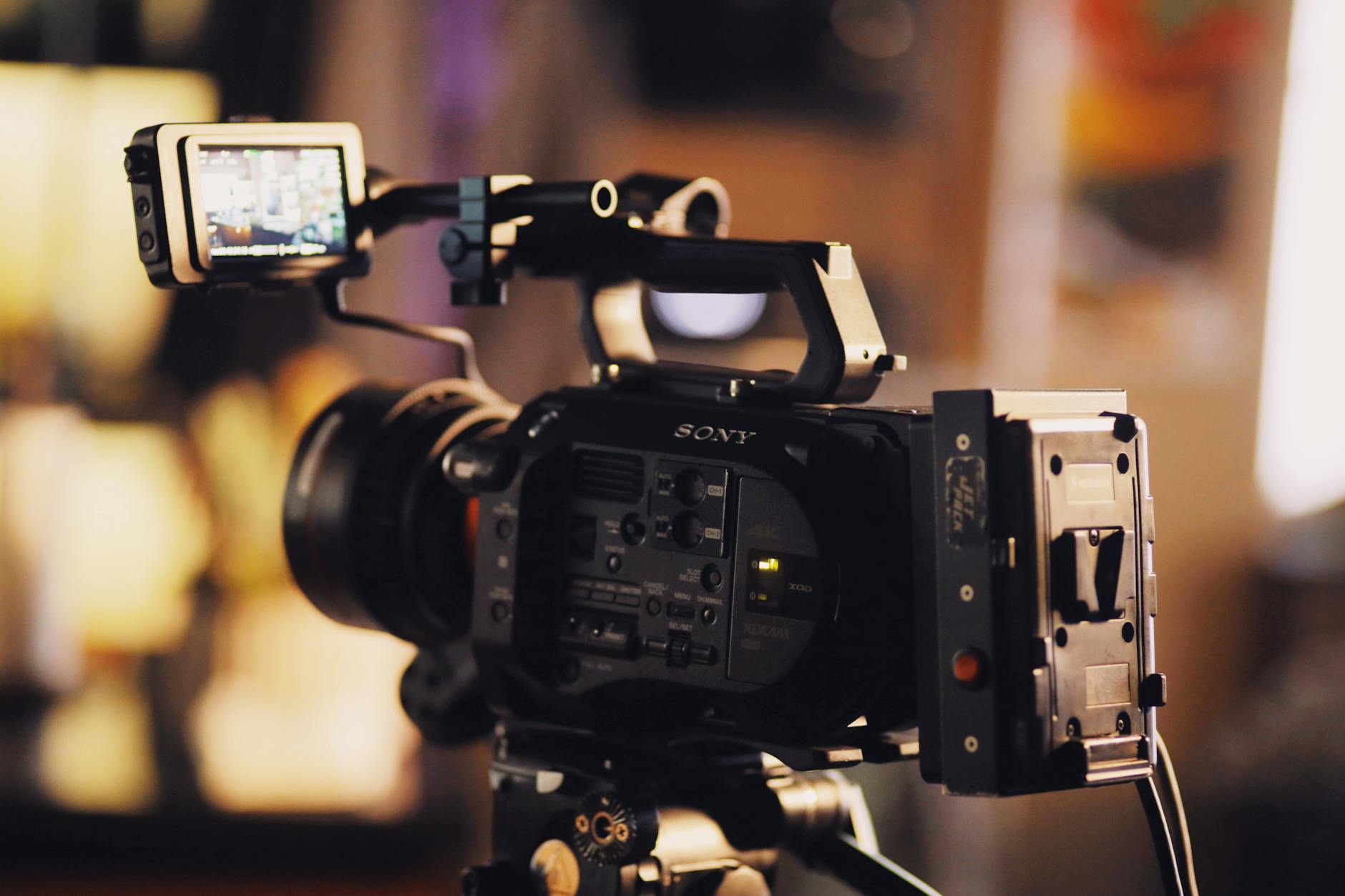
Webcam vs Dedicated Camera: Why the Pro Wins for Calls in 2026
| Feature | Webcam | Dedicated Camera |
|---|---|---|
| Best For | Casual video calls, basic streaming | Professional meetings, content creation |
| Price Range | $30–$150 | $500–$2,000 |
| Resolution & Frame Rate | 1080p at 30fps (up to 60fps high-end) | 4K at 60fps+ (often 120fps options) |
| Low-Light Performance | Moderate; often grainy in dim light | Excellent; large sensors, wide apertures |
| Audio Quality | Built-in mic, average clarity | No built-in mic (external options preferred) |
| Lens & Focus Control | Fixed lens, autofocus only | Interchangeable lenses, manual & auto focus |
| Connectivity & Setup | Plug-and-play via USB | HDMI/SDI, capture card often required |
| Our Verdict | ✓ Best for everyday remote workers | ✓ Best for professionals & streamers |
| Check Price | Amazon → | Amazon → |
As remote work, hybrid offices, and digital collaboration become the norm in 2026, the tools we use for professional video communication have never been more scrutinized. Among these, the choice between a built-in or external webcam and a dedicated professional camera is proving pivotal in shaping a professional digital presence. While webcams were once sufficient for casual Zoom calls or online classes, the bar has risen. Employers, clients, and collaborators now expect high-quality video that reflects credibility, preparation, and technical competence.
📋 Table of Contents
- Webcam vs Dedicated Camera: Why the Pro Wins for Calls in 2026
- The Evolution of Video Calls in 2026
- Video Quality: Pixels Are Not the Whole Picture
- Low Light Performance: Where Webcams Crumble
- Audio Quality: Beyond Built-In Mics
- Flexibility and Control: The Power of Manual Settings
- Software Integration and Workflow
- Audio-Video Sync and Latency
- Professional Presence and Brand Image
- Long-Term Value and Versatility
- Cost Consideration: Is It Worth the Investment?
- Environmental and Lighting Optimization
- The Verdict: Dedicated Cameras Dominate in 2026
- Top 5 Recommended Hardware Solutions for 2026
- Sony Alpha ZV-E1
- Canon EOS R50
- Elgato Cam Link 4K
- Logitech Brio Ultra HD Pro Webcam
- Rode VideoMic NTG
- Pros and Cons Summary
- Expert Verdict
- Frequently Asked Questions
- Final Thoughts: Upgrade Your Digital Presence
Yet, many professionals still rely on subpar hardware—laptop-integrated 720p webcams with grainy footage, inconsistent lighting performance, and poor audio. As virtual meetings become more nuanced, with screen sharing, facial expression reading, and nonverbal communication taking center stage, such low-end tools no longer cut it. The tide is turning. In 2026, a growing number of remote professionals and content-focused business individuals are opting for dedicated cameras, repurposed or specifically designed for video conferencing. But why? What actual advantages do they offer over even high-end webcams?
Selling this product?
Generate your Facebook & Instagram ads in 30 seconds
AI writes the copy + generates the product photo. 5 free tries, no credit card.
🏠 Get the Best Home Office Deals
Weekly deals + expert picks, free
Shop Related Products on Amazon
Shop Home office webcam on Amazon →
As an Amazon Associate I earn from qualifying purchases.
This article dives deep into the webcam vs dedicated camera debate, analyzing video quality, audio performance, lighting adaptability, software integration, versatility, and overall presence. We’ll reveal why, in 2026, the professional-grade dedicated camera is not just a luxury, but a strategic investment for serious digital communicators.
The Evolution of Video Calls in 2026
Video communication has evolved rapidly since the early 2020s. What began as fragmented Zoom sessions with unstable internet and awkward camera angles has matured into a refined tool for leadership, sales, training, and virtual networking. Platforms like Zoom, Microsoft Teams, Google Meet, and newer AI-driven conferencing tools now support HD video streams, background noise suppression, real-time translation, and enhanced digital whiteboarding. With such technical sophistication on the software side, the hardware bottleneck has shifted squarely to the end user’s setup.
As organizations implement digital presence policies, even subtle details matter. Studies from the 2025 McKinsey Remote Work Insights Report indicate that participants with higher video quality were perceived as 34% more trustworthy and 27% more competent in leadership evaluations. These findings underscore the business impact of image quality.
Moreover, hybrid workplaces now expect employees to present professionally—whether from a home office, co-working space, or even an airport lounge. The standard 720p webcam—with its limited sensor size, small aperture, and lack of depth control—struggles under anything less than perfect lighting. In contrast, dedicated cameras offer the control, resolution, and responsiveness needed for high-stakes virtual interaction.
Video Quality: Pixels Are Not the Whole Picture
It’s easy to assume that a higher megapixel count equates to better video. However, in the realm of video communication, actual performance hinges on more than just resolution. Key factors include dynamic range, sensor size, lens quality, low-light performance, and frame rate consistency.
Most consumer webcams operate with tiny 1/3” or 1/2.7” sensors. These sensors struggle in low ambient light, resulting in grainy, unfocused imagery, especially in evening meetings or dimly lit rooms. By comparison, dedicated cameras—especially mirrorless or DSLR models used with clean HDMI output—boast far larger sensors (APS-C or full-frame). Larger sensors capture more light, produce better dynamic range, and significantly reduce noise, even in challenging lighting.
For example, a webcam like the Logitech Brio 4K may deliver 3840×2160 resolution, but its small sensor and fixed lens mean it can’t fully utilize the data. The dynamic range is limited, often blowing out highlights (like windows in the background) or crushing shadows on the face. In contrast, a dedicated mirrorless camera can adjust shutter speed, ISO, and aperture independently, preserving detail across brightness gradients and delivering cinematic-quality visuals.
Additionally, professionals using dedicated cameras often enjoy shallow depth of field, which blurs the background subtly, putting focus on the speaker. This not only enhances aesthetic appeal but reduces distractions for viewers. Webcams, due to their ultra-wide fixed focus, capture everything in near-equal sharpness, allowing cluttered home offices or moving pets to become visual disruptions.
Low Light Performance: Where Webcams Crumble
One of the biggest pain points in virtual meetings is poor lighting. Natural light shifts throughout the day, and artificial lighting varies greatly by environment. Webcams—with their tiny sensors and fixed aperture—are notoriously weak in dim conditions. Noise reduction algorithms often smear facial details, leading to a plastic, artificial appearance.
Dedicated cameras shine here. With manual control over ISO sensitivity, shutter speed, and lens aperture, professionals can optimize their settings for low light without sacrificing clarity. Many also support advanced features like dual native ISO (found in Sony and Panasonic mirrorless models), which provides clean footage even at ISO 3200 or 6400. This allows for crystal-clear video during evening strategy calls or early morning stand-ups with global teams.
Furthermore, larger lenses can open up to f/1.4 or f/1.8, letting in significantly more light than the fixed f/2.0 or f/2.4 apertures of most webcams. The result? Brighter, more detailed facial expressions—with natural skin tones and texture—without needing expensive lighting setups.
Audio Quality: Beyond Built-In Mics
Webcams often come with built-in microphones, marketed as “noise-canceling” or “studio quality.” However, real-world performance rarely matches the claims. These mics, constrained by size and placement on the monitor or laptop, pick up ambient keyboard clicks, HVAC noise, and echo from speakers. In larger rooms, they lose clarity quickly.
While dedicated cameras don’t always include onboard audio, they are designed to integrate with external professional-grade microphones. When used as a video source with tools like Elgato Cam Link, OBS, or Duet Display, audio can be routed separately from a condenser or dynamic mic. This level of flexibility allows users to capture studio-level sound—clear voice, minimal background noise, and warmth—all synchronized with HD video.
In 2026, the standard for professional presence includes balanced audio-video quality. A crisp image paired with muffled audio undermines credibility just as much as poor video. A professional setup separates these components for optimized control, a feature webcams simply can’t match.
Flexibility and Control: The Power of Manual Settings
Webcams generally operate on “plug-and-play” principles. They offer minimal customization—sometimes through companion software—but lack access to manual exposure, focus, white balance, or frame rate adjustments. This can lead to inconsistent performance: a perfectly exposed face in the morning might be shadowed by noon due to changing light, with no way to correct it automatically.
Dedicated cameras, however, provide complete creative control. Users can lock focus on their face, set manual white balance to avoid unnatural color casts (common under LED lighting), and fix exposure to prevent flickering or overexposure. This consistency is crucial during long meetings, presentations, or multi-call days.
Moreover, dedicated cameras often support advanced accessories: external monitors for framing, battery grips for extended use, and lens filters for glare control. Some even support real-time LUTs (Look-Up Tables) for color grading, allowing users to maintain a consistent visual brand across appearances on podcasts, investor calls, and webinars.
Software Integration and Workflow
A common misconception is that using a dedicated camera is complicated. However, in 2026, the ecosystem has matured significantly. Tools like the Elgato Cam Link 4K, Duet Display, and Epiphan AV.io HD capture cards make it simple to route HDMI video from a camera directly into your video conferencing or streaming platform.
Capture devices convert the camera’s HDMI output into a virtual webcam feed recognized by Zoom, Teams, or OBS. This process is plug-and-play on most modern systems. Additionally, firmware updates and auto-detection features reduce setup time to under five minutes. Once configured, the camera operates just like any other webcam—but with far superior video.
Some newer mirrorless models, like select Sony and Canon cameras, even offer USB webcam mode natively through firmware updates. This eliminates the need for external capture cards, making the transition even smoother. These native modes support full HD (or 4K) video with manual controls maintained via companion apps, giving professionals the best of both worlds.
Audio-Video Sync and Latency
Another technical consideration is audio-video sync. Webcams usually have minimal latency because the audio and video are processed together. However, when using an external camera with a capture card, syncing can occasionally be an issue—especially if the system is under heavy load.
In 2026, most high-quality capture devices have solved this problem. Devices like the Elgato Cam Link 4K or Epiphan AV.io feature low-latency encoding and seamless driver support across Windows and macOS. Advanced systems even allow manual sync offset adjustments within conferencing apps, ensuring perfect lip sync during speech.
Additionally, dedicated cameras with clean HDMI output often disable on-screen displays (OSD) and record-only features that can interfere with clean video feed—ensuring a broadcast-ready image without overlays or blinking indicators.
Professional Presence and Brand Image
In an era where personal branding is paramount, your video setup speaks volumes. A crisp, well-lit image with sharp focus and consistent exposure conveys competence, attention to detail, and respect for your audience. It signals that you take your role—not just your technology—seriously.
Professionals using dedicated cameras can personalize their look: custom backdrops, studio lighting, on-brand color grading, and even virtual green screen effects. These tools are increasingly accessible and affordable, with many streamers and executives building “broadcast corners” in their homes.
Conversely, a fuzzy, poorly lit face on a generic webcam can unintentionally signal disengagement or lack of preparation. In competitive fields—consulting, sales, executive leadership—even subtle differences in perceived professionalism can affect outcomes in hiring, promotion, or client acquisition.
Long-Term Value and Versatility
Perhaps the most compelling case for a dedicated camera is versatility. While a webcam serves one primary purpose—video calling—a mirrorless or DSLR camera can be used for content creation, social media, product photography, training videos, and even filmmaking. Investing in a dedicated camera pays dividends across multiple domains.
For instance, a marketing executive might use their Sony Alpha 6700 for daily team calls using HDMI-out, then repurpose it that evening to shoot B-roll for a client campaign. A real estate agent could conduct virtual tours with high-quality video and transition seamlessly to taking property photos. This multifunctionality enhances return on investment.
Additionally, professional cameras are built to last. Durability, weather sealing, and modular components (rechargeable batteries, swappable lenses) make them more sustainable than disposable-style webcams, which often degrade within 2–3 years.
Cost Consideration: Is It Worth the Investment?
Webcams range from $30 to $300, with premium models like the Logitech Brio reaching $200. Dedicated cameras, on the other hand, can cost from $600 to over $2,000, depending on brand and configuration. At first glance, this seems like a steep premium. However, when viewed through the lens of long-term utility and impact, the math changes.
Consider the camera not just as a video tool, but as a multi-functional professional asset. Its impact on perception, communication effectiveness, and content output often justifies the price. Moreover, prices for used or entry-level mirrorless systems have dropped significantly in 2026, making high-quality gear more accessible.
Many companies now offer stipends for home office equipment, including cameras. Employees in marketing, client services, or leadership roles can often get partial or full reimbursement, reducing personal expense.
Environmental and Lighting Optimization
Even the best camera can’t overcome a terrible setup. That said, dedicated cameras give you more headroom to work with less-than-ideal environments. With better low-light performance, you don’t need studio lighting kits to appear professional. A simple softbox or ring light often suffices.
Additionally, manual white balance ensures that your skin tone remains natural under different light sources—avoiding the green or blue casts common with auto white balance on webcams under fluorescent flooring.
Dedicated cameras also allow for precise positioning. Mounting on a tripod lets you place the lens at eye level, promoting better posture and eye contact. In contrast, laptop webcams often sit too low, forcing users to stare downward—a position that can appear disengaged or uneasy.
The Verdict: Dedicated Cameras Dominate in 2026
While webcams have improved—especially models from Logitech, Razer, and Dell—they remain constrained by physics and design. Small sensors, fixed optics, and limited processing power prevent them from matching the image quality and control offered by dedicated cameras. In 2026, where digital presence equals professional capital, this gap is no longer trivial.
The rise of remote collaboration, AI-powered conferencing tools, and higher audience expectations means that every detail counts. A dedicated camera doesn’t just deliver better video—it enhances credibility, emotional connection, and overall communication effectiveness.
Whether you’re a C-suite executive, entrepreneur, consultant, or digital creator, upgrading to a professional camera isn’t just about looking good on camera. It’s about mastering your digital presence in a landscape where impressions are formed in seconds.
Top 5 Recommended Hardware Solutions for 2026
If you’re ready to make the leap from webcam to dedicated camera, here are our top five recommendations—combining value, performance, and ease of integration for professional video calls in 2026.
Sony Alpha ZV-E1
- 4K 120fps video
- AI-powered autofocus
- Built-in directional microphone
Check Price on Amazon
Canon EOS R50
- 4K 30fps uncropped
- Lightweight design
- USB webcam mode
Elgato Cam Link 4K
- HDMI to USB capture
- Supports 4K
- Plug-and-play compatibility
Logitech Brio Ultra HD Pro Webcam
- 4K resolution
- RightLight 3
- HDR support
Rode VideoMic NTG
- Shotgun microphone
- Low-noise preamp
- USB and XLR output
Pros and Cons Summary
- ✅ Superior image quality with larger sensors
- ✅ Manual control over focus, exposure, and white balance
- ✅ Better low-light performance and depth of field
- ✅ Versatile for multiple uses beyond video calls
- ✅ Enhances professional presence and credibility
- ❌ Higher initial cost
- ❌ Requires additional accessories (capture card, mount)
- ❌ Steeper learning curve for beginners
Expert Verdict
Frequently Asked Questions
Final Thoughts: Upgrade Your Digital Presence
In 2026, the way you show up on screen matters more than ever. With hybrid work entrenched and virtual collaboration central to business operations, every meeting is an opportunity to project confidence, clarity, and professionalism. The tools you choose shape that perception.
While webcams have served us well through the early stages of remote work, they are now at the limits of their capabilities. Dedicated cameras, once considered overkill, are emerging as essential hardware for forward-thinking professionals. They offer unmatched control, image quality, and long-term utility—transforming virtual communication from functional to formidable.
Whether you’re pitching investors, leading teams, or teaching online, upgrading to a dedicated camera isn’t just about better video. It’s about owning your digital narrative. In a world where presence is perceived in pixels, make sure yours are sharp, clear, and authoritative.
Product A: Logitech Brio 4K Pro Webcam
- 4K ultra HD resolution
- RightLight 3 with HDR
- Privacy shutter and glass lens
Product B: Sony ZV-E10L Mirrorless Vlog Camera
- APS-C sensor for cinematic quality
- Real-time Eye AF and tracking
- Interchangeable lenses with E-mount
- ✅ Superior image clarity and depth of field
- ✅ Advanced autofocus and low-light performance
- ✅ Greater creative control with manual settings
- ❌ Higher cost and complexity
- ❌ Requires additional accessories for video calls
- ❌ Steeper learning curve for beginners
- ✅ Superior image quality with larger sensors and better low-light performance
- ✅ Interchangeable lenses for customizable framing and depth of field
- ✅ Enhanced professionalism with crisp, broadcast-quality video for high-stakes calls
- ❌ Higher initial cost compared to built-in or standard webcams
- ❌ Requires additional setup with capture card or software for computer use
- ❌ Larger size and less plug-and-play convenience
- ✅ Superior image quality with larger sensors and better low-light performance
- ✅ Interchangeable lenses for customizable framing and depth of field
- ✅ Manual controls for focus, exposure, and white balance enhance professional appearance
- ❌ Higher initial cost compared to built-in or standard webcams
- ❌ Requires additional accessories like capture cards and lighting for optimal setup
- ✅ Superior image quality with adjustable focus and low-light performance
- ✅ Interchangeable lenses for customized framing and professional look
- ✅ Manual controls for exposure, white balance, and audio input
- ❌ Higher cost compared to built-in or standard webcams
- ❌ Requires additional accessories like capture cards and tripods
- ❌ Steeper learning curve for setup and optimization
The future of calling is not just HD. It’s professional, intentional, and powered by pro-grade hardware. In 2026, it’s time to make the switch.

Sarah Tillman brings a design-first perspective to home office reviews. With a degree in Interior Architecture from the Rhode Island School of Design and 8 years of experience designing home offices for clients across New York and Los Angeles, Sarah evaluates products on aesthetics, spatial...
View all reviews by Sarah Tillman →